Universal TV Remote Control
- 3.9
- Rating
- 5.00M
- Installs
- Free
- Price
 Analysis by App-foxy
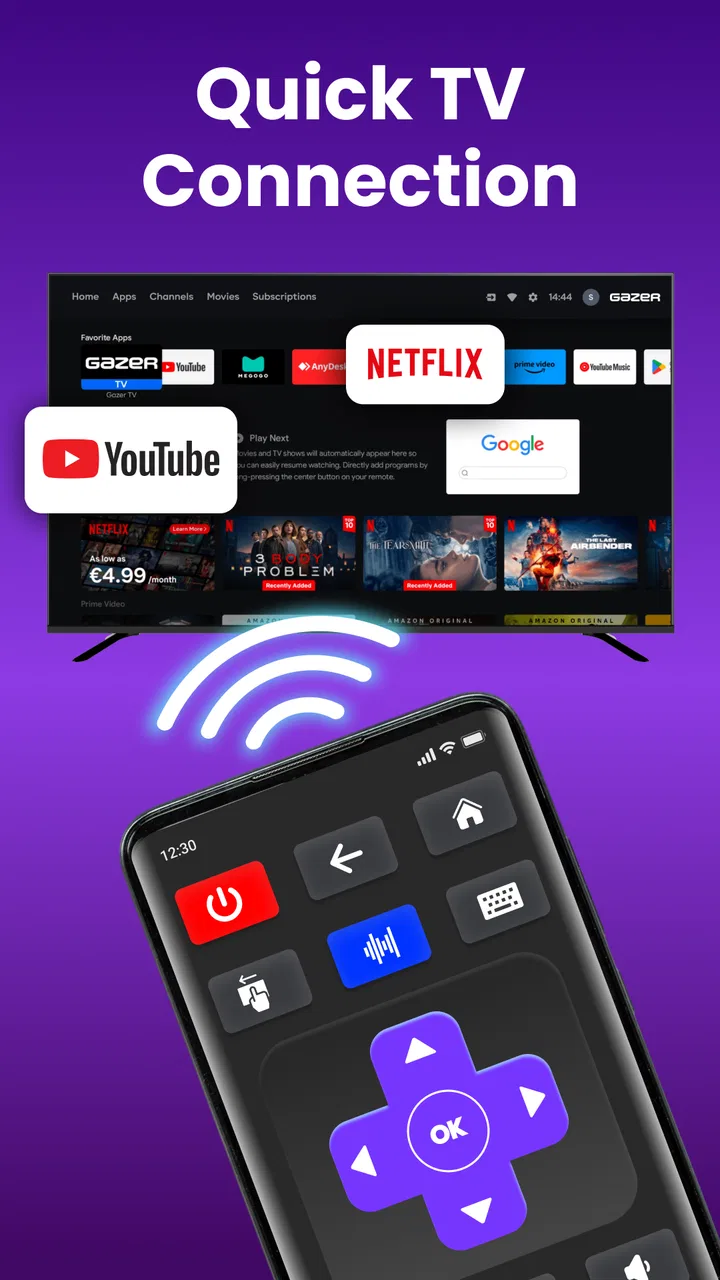
I tried Universal TV Remote Control as a practical way to manage a television from an Android phone, and my first impression was that it is aimed at a very familiar problem: the physical remote disappears, stops responding, or is simply less convenient than the phone already in your hand. The app belongs to the House & Home category, is free to install, and is designed around television control through infrared signals and Wi-Fi. That combination makes it more flexible than an app that depends on only one connection method, although the experience still depends heavily on the phone and TV you are using.
The important thing to understand before installing it is that “universal” does not mean every phone can control every television in exactly the same way. The app supports Android and Roku TV use, but the available control path matters. A phone with infrared hardware can work with compatible televisions without relying on the home network. Wi-Fi control, on the other hand, requires the television and phone to communicate through the same network and usually needs the TV to be available and ready for pairing. Knowing that distinction saves a lot of frustration during the first attempt.
What to expect from the remote
The app is developed by Galixo.AI - Super TopVPN PROXY, MUSIC PLAYER and has reached over five million installs, with an average rating of 3.9 from around seven thousand ratings. Those figures suggest that it has found a substantial audience, but they also hint at a mixed experience: a remote-control app can feel excellent on one phone and awkward on another because hardware support, television compatibility, and network setup are not identical for everyone.
You May Also Like

 Blood Strike: 2.5 Anniversary
Blood Strike’s Loadouts Turn Every Drop Into a Tactical Gamble
A close look at Blood Strike’s custom loadouts: how fast access to signature weapons reshapes its battle royale rhythm, rewards preparation, and narrows the gap between fights.

 Pandora - Music & Podcasts
Pandora’s Music Is Easy to Start, but Harder to Recover
Pandora’s strength is its low-effort path from a seed to a station. Its weak spot is how much confidence it asks you to place in connection, setup, and quiet recovery.

 8 Ball Pool
 Is Built on Rivalries, Rematches, and Routine
A close look at the rivalries, rematches, shared routines, and unanswered safety questions that turn a quick pool match into a persistent mobile community.

 Samsung Music
’s Quiet Strength Is Playing What You Already Own
Its reach comes less from spectacle than from dependable access to a personal library. That simplicity is both the app’s strongest retention engine and its ceiling.

 AccuWeather: Weather Radar
AccuWeather Review: A Quick, Clear Forecast for Everyday Decisions
For everyday plans, the best forecast is the one you can understand quickly. AccuWeather makes rain timing, radar, and local conditions easy to act on, with a few trade-offs.

 Hill Climb Racing
Why Hill Climb Racing Still Turns Crashes Into One More Run
A tiny car, a bumpy hill and one more upgrade: Hill Climb Racing keeps resurfacing because its simple chaos makes every near-miss feel personal.
More From Our News Desk
View All News


In everyday use, I would treat it as a convenient backup or replacement remote rather than automatically assuming it will outperform the original handset. A phone is easier to locate than a small remote, and it can be useful when you are already browsing for a program or checking a message. It is especially handy in a shared room where the physical remote often gets left behind on a sofa, carried to another room, or buried under cushions.
The free installation lowers the barrier to trying it, while optional in-app purchases range from a few dollars to amounts approaching thirty dollars per item. I would not pay immediately. I would first confirm that the basic connection works with my particular television, because a paid upgrade cannot solve a phone that lacks the required infrared hardware or a TV that is not reachable through the chosen network route.
The app is rated for Everyone, and it is compatible with Android eight and later. Its current version is 1.9.3. For a first-time user, the practical meaning is simple: older Android phones may be excluded, but anyone on a reasonably recent supported device can begin without needing a special account of their own just to test the central idea.
Choosing the right connection before you begin
There are two useful mental models. Infrared behaves like a traditional remote: the phone sends a signal toward the television, so direction and distance matter. Wi-Fi behaves more like a network command: the phone and television need to find each other through the same local connection. If the TV is switched off in a way that removes it from the network, Wi-Fi control may be less convenient than expected, while infrared can be more direct when the phone supports it.
That is the first non-obvious trade-off. Wi-Fi is usually the more attractive route for a phone without infrared hardware, but it can involve discovery and pairing. Infrared can feel immediate, yet it is limited by the phone’s hardware and by the need to point the device toward the screen. I would decide which route is realistic before blaming the app for a failed setup.
Getting from installation to the first working command
After installing the app, I would begin with a calm, deliberate setup rather than tapping through every option quickly. Keep the television powered on, place the phone reasonably close to it, and make sure you know whether you are attempting infrared control or Wi-Fi control. If you are using a Roku TV, have its network connection active and keep the phone on the same home network. That simple preparation addresses the most common source of confusion: trying to pair devices that are not actually visible to each other.
For infrared, point the top edge of the phone toward the television and test a basic command such as power or volume. Do not assume that a silent result means the app is broken. Move the phone slightly, remove anything that might block the phone’s sensor area, and try again while facing the TV directly. Infrared is line-of-sight technology, so the phone cannot be treated exactly like a remote left on a table.
For Wi-Fi, keep both devices connected to the same network rather than using mobile data on the phone. If the television appears in the app’s device selection, choose the matching screen carefully. In a home with several televisions, selecting the first visible device without checking its identity can create the impression that commands are failing when they are simply being sent somewhere else.
My recommended first test is not channel browsing or a complicated menu action. Start with volume down once, wait for the response, and then try volume up once. A small, reversible action tells you whether the connection is alive without turning the TV off or interrupting something important. Once that works, test navigation and input selection. This staged approach is more reassuring than repeatedly pressing power and wondering whether the television is reacting slowly.
What a successful first session looks like
A meaningful first success is being able to change the volume from the phone without reaching for the original remote. That proves more than simply seeing a device name on screen. It confirms that the selected control method, the chosen television profile, and the physical position of the phone are all suitable for your setup.
Once volume works, I would test one directional button and then the confirmation button. This matters because a remote can appear connected while only a limited group of commands behaves correctly. If navigation works as well, the app becomes much more useful for browsing menus and applications. If only volume responds, I would avoid assuming that every other function will behave identically and would continue testing before relying on it as the only remote.
A realistic example is a family movie night. The physical remote is in another room, the TV is already playing, and someone wants to lower the volume without standing up. I can open the app, choose the prepared television, point the phone at the screen if using infrared, and make a small adjustment. That is where this type of app earns its place: not through novelty, but through removing a minor interruption at exactly the right moment.
Another useful scenario is a guest room or temporary living arrangement where the original remote is missing. A phone-based controller can be worth trying before buying replacement hardware. I would still keep expectations sensible, because the success of that solution depends on whether the phone can use infrared or whether the television is already accessible through Wi-Fi.
Where first-time users usually get stuck
The biggest confusion is often the word “universal.” Television brands and models can expose different control behavior, and a phone’s capabilities are not identical to another phone’s capabilities. If the app offers a choice between connection types, I would not repeatedly test the wrong one. A phone without infrared cannot be made into an infrared remote through software alone, so Wi-Fi is the sensible path in that situation.
Network discovery creates a different kind of friction. A phone and television may both show that they are connected to the internet while still being separated by the home network’s configuration. Guest networks, device isolation, or a television that has fallen offline can prevent discovery. The useful troubleshooting order is straightforward: check that both devices use the same network, wake the TV fully, close and reopen the app, and then try discovery again. Restarting everything immediately is less informative than checking those basics first.
Infrared has its own easy-to-miss limitation. Pointing the screen toward the TV is not optional, and a thick case or an awkward grip can interfere with the signal path. I would hold the phone with the top edge facing the television and press one command at a time. Rapidly tapping several controls makes it difficult to tell whether the signal was missed, delayed, or simply not supported by the selected remote layout.
There is also a practical difference between controlling a TV that is already awake and trying to wake one from a low-power state. Wi-Fi control may depend on the television remaining reachable, while infrared can be more like pressing a physical power button. I would test the power command separately and avoid assuming that a successful volume change guarantees identical behavior when the screen is off.
Making the app less annoying in daily use
The best workflow is to prepare the connection while the TV is working normally, not during an emergency when the original remote has vanished. Once the app recognizes the correct television, keep that selection in mind and avoid creating unnecessary duplicate setups. If the household has multiple screens, label them mentally by room and verify the target before sending power or input commands.
I also recommend using the app for small jobs first. Volume changes, directional navigation, and input switching are easy to verify. More disruptive actions, such as powering down the television, should come later. This is a small habit, but it prevents the classic mistake of repeatedly pressing a button because the response was not instant, only to send the same command several times.
For infrared users, sitting where the phone has a clear view of the screen is more important than holding it like a normal smartphone. For Wi-Fi users, keeping the television on the regular home network is more important than physical pointing. These are separate habits, and mixing them up is why two people can describe the same app very differently.
Optional purchases deserve a similarly cautious approach. Since the app is free to start, I would use the basic experience long enough to decide whether the connection is dependable in the room where I need it. If the free version already handles the commands I use, paying may not add meaningful value for me. If an upgrade is presented, I would read exactly what it changes rather than treating payment as a general compatibility fix.
Who should use it and who should choose another option
I think Universal TV Remote Control is a sensible trial for someone who regularly misplaces the physical remote, wants a backup for a Roku TV, or prefers keeping simple household controls on a phone. It can also help renters, visitors, and people setting up a television in a room where buying another physical remote feels unnecessary. The free starting point makes that experiment relatively low risk.
It is less suitable for someone who needs guaranteed control with no setup effort. If the television is shared by several people, a physical remote may remain faster for guests who do not want to install an app or wait for pairing. A dedicated replacement remote is also the better choice when the phone has no infrared capability, the TV is not consistently connected to Wi-Fi, or reliable power control is essential.
I would also skip it as a primary solution if I regularly need a very specialized control layout and the app does not present those commands for my television. A universal controller is valuable when it covers the actions I actually use, not when it merely displays a remote-shaped interface. Testing navigation, volume, input, and power before depending on it is therefore more important than judging the design at a glance.
Compared with the usual manufacturer remote app, this one is appealing because it focuses on a broader universal role and combines infrared with Wi-Fi support. A brand-specific app may offer deeper integration for one television family, while a physical remote avoids phone battery, notifications, and network issues altogether. My preference would be this app for convenience and backup use, a manufacturer option for deeper device-specific control, and a physical remote for the most predictable shared household experience.
The developer name, Galixo.AI - Super TopVPN PROXY, MUSIC PLAYER, may look broader than the app’s television purpose, so I would judge the product by the remote experience itself rather than by the rest of the developer label. What matters in practice is whether the app finds the intended TV and responds consistently to the commands I need.
My practical recommendation after testing the workflow
I would install it when I wanted a free first attempt at replacing a missing remote, especially for a compatible Android phone or Roku TV already connected at home. I would begin with volume, then navigation, then input, and only afterward rely on power control. That sequence exposes compatibility problems quickly and avoids unnecessary disruption.
I would not present it as a universal guarantee. The app’s real strength is convenience across two connection approaches, while its real weakness is that those approaches have different requirements that are easy to overlook. Infrared needs suitable phone hardware and a clear path to the TV; Wi-Fi needs a reachable television and a shared network. Once that distinction is understood, the setup feels much less mysterious.
For me, the deciding question is not whether it can replace every button on every remote. It is whether it can reliably handle the few actions I perform most often in my room. If the answer is yes, the phone becomes a useful household backup that is usually close at hand. If the answer is no, a standard physical remote or a television-specific alternative will be less frustrating.
Overall, I see Universal TV Remote Control as a practical, free-to-try tool rather than a complete replacement for every television setup. Its strongest use is the everyday rescue: the remote is missing, the volume needs changing, or a Roku TV is ready on the home network and I want control from the device already in my hand. Start slowly, identify the correct connection method, test a harmless command, and only consider an in-app purchase after the basic experience works. With those expectations, it can be a worthwhile addition to an Android household; without them, the word “universal” may promise more certainty than any phone-based remote can deliver.
FAQs for Universal TV Remote Control
01Is Universal TV Remote Control compatible with all TV brands and models?
Universal TV Remote Control is designed to be compatible with a wide range of TV brands and models. However, compatibility may vary depending on the specific make and model of your TV. It's advisable to check the app's compatibility list in the app description or contact customer support for confirmation before downloading.
02Do I need an internet connection to use Universal TV Remote Control?
The Universal TV Remote Control app primarily uses infrared (IR) technology to communicate with your TV, which does not require an internet connection. However, some advanced features, like smart TV control, may need Wi-Fi access. Check the app's requirements to ensure full functionality for your setup.
03Can I use the app to control other devices besides my TV?
Yes, the Universal TV Remote Control app often supports other home entertainment devices such as DVD players, sound systems, and streaming devices. The extent of its control capabilities can vary, so review the app’s feature list to ensure it meets your specific needs.
04How do I set up the Universal TV Remote Control app?
Setting up the Universal TV Remote Control app is generally straightforward. After downloading and installing, open the app and follow the on-screen instructions to sync it with your TV. This usually involves selecting your TV brand and model, then testing the remote functions to ensure proper connection.
05What should I do if the Universal TV Remote Control app is not working?
If the app is not functioning correctly, first ensure that your device has an IR blaster, which is necessary for most TVs. Also, check for any app updates or restart your device. If issues persist, consult the app's troubleshooting guide or contact support for further assistance.
Pros
- Easy to set up and use
- Compatible with most TV brands
- Free version available
- Customizable interface
- Supports voice commands
Cons
- Ads can be intrusive
- Limited features in free version
- Requires stable internet connection
- May have connectivity issues
- Not compatible with all devices

Universal TV Remote Control
Gallery